

What is an AI agent platform?
An AI agent platform is software for building, running and supervising agents that plan steps, use connected tools and act on your behalf. The best AI agent platforms for automating repetitive business tasks differ in three ways: who builds the agents, how the vendor bills for them, and how much a person can review before an agent writes to another system. This guide compares AI agent platforms on those three points and names real products. Each billing fact links to the vendor's own page.
Last updated October 27, 2026.
Most platforms bundle the same parts, whatever the label on the slide:
- A way to define an agent: code, a visual canvas, or a plain-language description.
- Triggers that start work manually, on a schedule, or when an event happens.
- Connections to the tools the agent reads from and writes to.
- Knowledge the agent can look up while it works.
- Run history, so you can see what happened after the fact.
- Approval controls for actions that change something outside the platform.
For the underlying concept, see what an AI agent is. For the narrower question of agents against fixed automations, see AI agent vs workflow automation.
Same label, different homework
The categories of AI agent platforms differ by who builds and maintains the system, how much control the buyer needs, and whether the job is general or domain-specific. Frameworks favor engineering teams, workflow builders favor repeatable operations, and vertical products favor a fixed business process. The right choice depends on who owns the agent after launch and what it must connect to.
Walk into a vendor demo with "agent" on the slide and you might be looking at a Python SDK or a drag-and-drop flow canvas. You might just as easily be looking at a product that only makes sense if you run a support queue. All of them get filed under the same umbrella, and your procurement spreadsheet can't tell them apart. Your team can.
An AI agent platform is a shelf with three common shapes on it. Mix them up and you end up with a science project for people who wanted a button, or a polished app that can't reach the one internal tool your workflow depends on. The shapes say less about which product is smarter than about who does the work after the contract is signed.
Frameworks: you are the platform
Frameworks hand engineers libraries, abstractions and patterns for agents that plan, call tools and hold context across steps. You bring the model choice, hosting, observability, auth, rate limits and the boring glue that turns a clever loop into something legal to run on Monday morning.
This category fits when the agent is the product, or when your workflow is wierd enough that no vendor will ever prioritize your edge case. You can compose exactly the behavior you want, and you inherit exactly the maintenance you create. Every new integration lands in your ticket queue. Every runaway loop pages you, unless you built the guardrails yourself.
Framework buyers usually have a strong engineering culture and can live with iteration measured in quarters instead of afternoons. If nobody on your team has shipped production automation before, a framework is often a long detour dressed up as flexibility.
Ask yourself whether you want to own the runtime or own the outcome. Frameworks optimize for the first. For some companies that's the right trade. For others it's an expensive hobby.
Workflow builders: repeatability without a repo
Workflow builders sit a step closer to the business. They assume you care less about import paths and more about triggers, schedules, handoffs between steps, and a record of what ran when somebody asks awkward questions in Slack.
You wire models to actions through a UI or light configuration, and multi-step flows are first-class. The vendor handles much of the hosting, though you still choose what the agent may touch and what must stop for a human.
This is where most operations teams land when they want agents for recurring busywork: research packs, weekly reports, ticket triage drafts, launch checklists that actually fire on schedule. A builder wins when the pattern is stable enough to template but too fiddly to trust to a one-off chat thread.
The failure mode differs from frameworks. You may hit a ceiling when you need deep custom logic, exotic tooling and deployment rules the builder never imagined. You may also find that "visual" still means someone has to think like a programmer once the branches multiply.
If your success metric is "runs every Tuesday without heroic manual effort," a workflow builder usually beats raw code. If it's "novel agent architecture," it probably doesn't.
Vertical products: the job is pre-decided
Vertical products look like ordinary software with agent behavior baked into one domain: support copilots, sales engagement assistants, coding agents tied to a repo host, industry-specific research tools. You buy the workflow the category implies, and customization happens inside guardrails the vendor already drew.
Setup can be fast because the product already knows what "good" looks like for that job. Integration depth varies, but the happy path is narrow on purpose. That's a feature until it isn't.
Vertical tools struggle when your process doesn't match the template. They also multiply across departments, each with its own login, its own data silo and its own definition of an "agent." Finance buys one. Product buys another. Nobody can say whether the two contradicted each other last week.
Choose vertical software when the problem is fixed and the vendor's map matches yours. Choose something more general when the same team needs one agent layer across Stripe, email, docs and whatever you adopt next quarter.
Questions that sort the shelf
Before you shortlist vendors, write your answers down. Short is fine. Honest is better.
Who builds the first version, and who fixes it when the API changes? If the answer is always engineering, frameworks belong on the list. If operations or an ops-minded founder should own the iteration, lean toward a builder or a vertical product.
Does the work run on a calendar or an event, with history you can audit? Chat products can fake that with reminders and discipline. Platforms made for agents treat schedules and triggers as ordinary furniture, with run logs sitting beside them instead of on a wish list.
What may the agent read, and what may it write? Read-heavy research and summarization is lower risk than send-email-and-update-billing. If writes matter, ask how approval works. A platform that can't pause before a destructive action is one you'll definately switch off after the first scare.
Where does company knowledge live, and can the agent use it without a manual export every morning? An agent that only knows what you paste into a thread forgets your business by lunch. Structured knowledge connected to source systems acts more like a colleague who read the handbook.
How many tools must one agent touch in a single run? Vertical products optimize for one neighborhood. Builders and frameworks differ in how painful the fifth integration gets.
What does "done" look like for week one? If the goal is one dependable workflow in production, weight time-to-first-run over feature breadth. A platform you'll grow into is still a platform you didn't use this month.
How AI Agent helps
AI Agent is a no-code platform to build and deploy agents that run busywork automation: research, workflows, reports, and more. Workflows handle multi-step jobs on a schedule or when something triggers them. Autopilots run agents on their own when that fits the job. Company Brain holds connected structured knowledge that agents read while they work. Analysis stays read-only against source tables, and proposed writes wait for a human to approve them.
It connects to tools teams already use, including Stripe, PostHog, GitHub, Notion, Linear, Slack, and Gmail. The pitch: get more done without doing more.
Pick the category that matches who will maintain the agent, then pick the vendor that makes week one boring in the best way.
Best AI agent platforms for automating repetitive business tasks
For repetitive business tasks, the usual shortlist is Zapier, Make and n8n for workflow automation, Microsoft Copilot Studio and Salesforce Agentforce for teams inside those suites, Lindy and Gumloop for agent builders, LangGraph and CrewAI for engineering teams, and AI Agent for a hosted workspace with approvals built in. The right one depends on the category from the sections above. Each entry below states how the vendor bills, because the billing unit shapes what a busy month costs.
- Zapier connects apps with trigger and action steps. It counts a task for each successful action step. Its agent product, AI by Zapier (formerly Zapier Agents), now bills in the same tasks as the rest of Zapier. The older Zapier Agents product was metered in activities, separate from tasks.
- Make builds scenarios from modules on a visual canvas. Credits are its billing unit, and most module actions use one credit.
- n8n is a visual workflow tool with code extensions. Its pricing is based on monthly workflow executions, regardless of how many steps a workflow has. It offers self-hosted editions under a fair-code license. See also n8n alternatives.
- Microsoft Copilot Studio is a low-code studio for agents and workflows. It bills in Copilot Credits, pooled across a tenant.
- Salesforce Agentforce builds agents on Salesforce data and logic. Salesforce sells it by Flex Credits per action, by conversation, or per user.
- Lindy is a hosted assistant that works in Slack and through scheduled routines. Its credits measure the work Lindy does, and every active user in a workspace is billed.
- Gumloop is a hosted agent builder. Its pricing page lists included credits, an orchestration fee, and unlimited seats.
- LangGraph is an open-source orchestration framework and runtime for long-running, stateful agents. CrewAI is an open-source framework for multi-agent systems and event-driven flows. Both belong to the framework category: you host and operate them.
AI Agent is a hosted workspace for you, your teams and your agents. Workflows are canvases of steps that can branch and pause at an Approval block. Autopilots give one agent a written task, a trigger and an output. Both run on a schedule or a trigger and write to one run history. AI Agent exposes 50 connections carrying 6,581 tool actions. It meters tool actions from a credit pool and does not meter connections or seats.
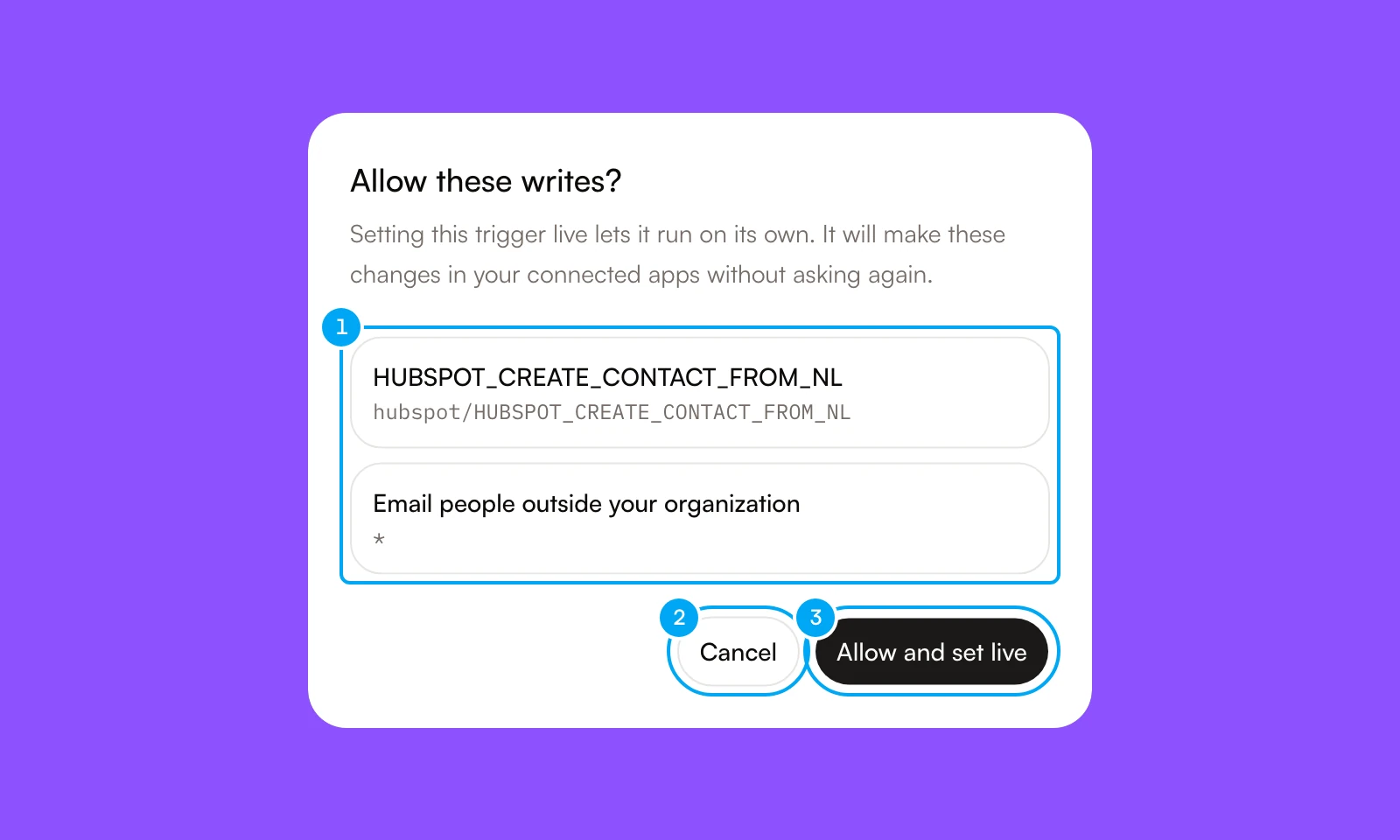
Approval is the main design choice. When an agent proposes an action on a connected app, a card waits for you to approve or reject it, and nothing runs until you decide. A workflow author can allow specific writes once, in a dialog that lists each write before the trigger goes live.
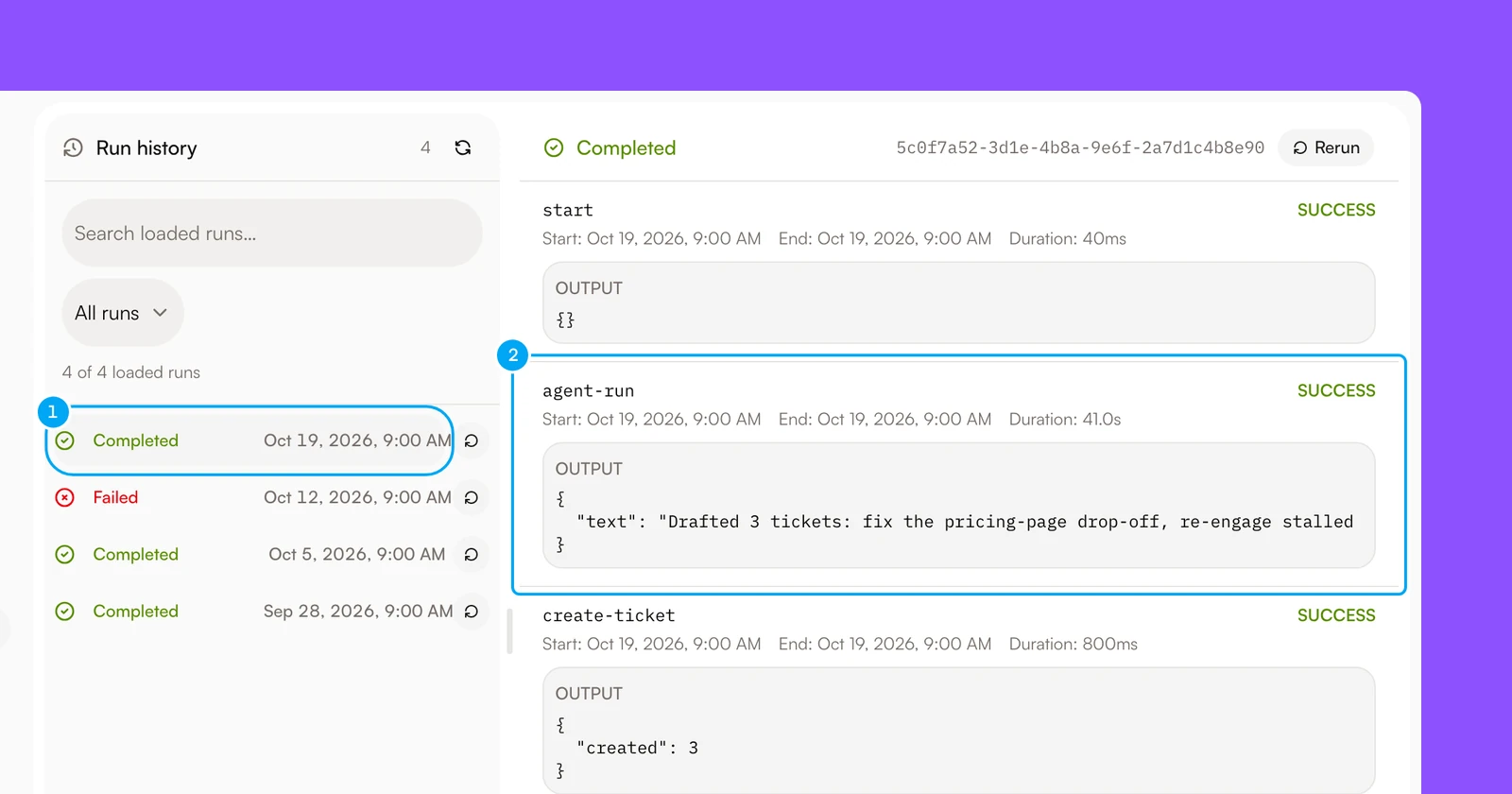
Every run gets recorded, so "what did it do last Tuesday?" has an answer. Open a run to see each step, its output, its start time and its duration, and rerun it from the same screen.
Where AI Agent is not the best fit
AI Agent doesn't suit every team. Choose another platform in these cases:
- You must run the platform on your own servers. AI Agent is vendor-hosted and can't be self-hosted. n8n offers self-hosted editions, and LangGraph and CrewAI run wherever you deploy them.
- You need custom runtime logic. The Code step in AI Agent is a Labs feature that runs a short JavaScript snippet in a sandbox with no network or file access. A framework such as LangGraph gives you full control of the runtime.
- Your work lives inside one suite. Agentforce is built around Salesforce data and flows, and Copilot Studio publishes agents to channels such as Microsoft Teams. Teams centered on those suites often get further inside them.
- You need a simple two-app automation. A single Zapier step that copies a form entry into a sheet doesn't need an agent platform, and an agent platform would be a sledgehammer for that walnut.
- You need event or webhook triggers on a low-cost plan. They need the Pro plan or higher. The Free and Start plans don't include them. Check the pricing page for current limits.
- You need a stable visual canvas today. The Workflows area is marked Beta in the product. Autopilots are a separate feature.
How the options compare
| Tool | Best for | What you are metered on | Self-host | Where it hurts |
|---|---|---|---|---|
| AI Agent | No-code agents for recurring research, reports, and workflows | Tool actions from a credit pool; connections and seats are not metered | No | Deep custom runtime behavior and self-managed deployment |
| Microsoft Power Automate | Business workflows across Microsoft services and connected systems | Flow runs, action executions, and premium connector usage | No | Complex agent behavior and workflows outside its connector model |
| Zapier | Straightforward app-to-app automation | Successful automation tasks and app action usage | No | Deep branching, long-running processes, and custom runtime logic |
| LangChain | Engineer-built agents with custom tools and control | Infrastructure, model usage, and tool calls | Yes | Hosting, monitoring, authentication, and integration maintenance |
| UiPath | Enterprise process automation with attended and unattended robots | Robot execution, automation activity, and platform capacity | Yes | Lightweight experiments and workflows outside enterprise process controls |
| n8n | Technical teams building visual workflows with code extensions | Workflow executions and self-managed compute usage | Yes | Operational ownership, governance, and complex agent behavior |
| Salesforce Agentforce | Agent-assisted work inside Salesforce-centered teams | Agent conversations, actions, and Salesforce data usage | No | Processes outside Salesforce and integrations requiring broad platform control |
| Make | Visual scenarios that connect apps with routing and branching | Credits, mostly one per module action | No | Long scenarios consume credits at every step |
| Microsoft Copilot Studio | Low-code agents and workflows in Microsoft-centered organizations | Copilot Credits pooled across the tenant | No | Costs follow agent design, since answers and actions use credits |
| Lindy | Hosted assistant for Slack-based teams and scheduled routines | Credits for work done; every active user in a workspace is billed | No | Per-user billing grows as more teammates use it |
| Gumloop | Hosted agent builder with unlimited agents and seats | Credits plus an orchestration fee | No | No self-managed edition; a virtual private cloud is an Enterprise option |
| CrewAI | Developers building multi-agent systems with Crews and Flows | Your own hosting and model usage, since the framework is open source | Yes | You own the runtime, monitoring, and integrations |
Billing units for Make, Copilot Studio, Lindy, Gumloop and CrewAI come from the vendor pages linked in the shortlist above. Vendors change plans often, and pricing pages go stale faster than milk, so confirm current terms on each one before you buy. For a deeper look at how vendors charge, see AI agent pricing models.
How to choose an AI agent platform in five steps
- Name the owner. If engineers will maintain the agents, shortlist a framework such as LangGraph or CrewAI. If an operations team will, shortlist a workflow builder or a hosted workspace.
- Name the home system. If the work lives in Salesforce or Microsoft 365, test Agentforce or Copilot Studio first. If it spans many separate tools, test Zapier, Make, n8n or AI Agent.
- Name the riskiest write. Pick the action that would hurt most if it ran wrongly, such as sending an email or updating billing, and check how each platform pauses before it.
- Match the billing unit to your volume. Tasks, credits, executions, conversations and seats each grow differently. Estimate a busy month, not an average one. Averages are how surprise invoices happen.
- Run one real workflow for a week. Pick a job that recurs, such as a weekly report, and see whether it runs without you rescuing it.
Frequently asked questions
How much does an AI agent platform cost?
Cost depends on whether you are paying for hosted software, workflow activity, infrastructure, model usage, or engineering time. AI Agent's paid plans start at $49 for the Start tier, and Pro is $149. Frameworks shift more of the cost into development and ongoing operations, while vertical products bundle more of the workflow into the product itself.
How much effort does each type of platform require?
Frameworks need engineers to build the runtime, integrations, controls and monitoring. Workflow builders cut the coding but still demand careful design once branches and approvals pile up. Vertical products can be quicker to configure when your business process matches the product.
What risks should a buyer assess before choosing a platform?
Check what the agent can read and write, how approvals work, and whether runs are recorded for review. Sending messages or changing business records carries more risk than producing a research summary. A useful platform can pause before sensitive actions and lets you inspect the result of each run.
What usually breaks after an agent platform is deployed?
Integrations can break when an external service changes, and custom logic gets hard to follow when a visual workflow grows crowded. Framework users maintain more of the runtime themselves, while workflow builder users may hit limits around unusual tools or deployment rules. Vertical products can struggle when your team's process falls outside the template the product was built for.
What does an AI agent platform replace?
It can replace recurring manual research, reporting, triage, checklists, and the glue between business tools. It can also replace ad hoc chat instructions when the work needs a schedule, a trigger, a run history, or an approval step. It still needs people to define the process and review sensitive outcomes.