

Hours, not headcount
AI agents for small businesses work best on recurring jobs that eat staff time without needing much judgment. Start with one narrow workflow, keep a person approving anything important, and widen the scope only after the results hold up. The best early uses are inbound triage, weekly reporting, and follow-up.
Small businesses rarely fail because nobody thought of hiring. They stall because the same five people keep doing work that doesn't need their judgment: copying numbers into a spreadsheet, answering the same pre-sales question, chasing a late invoice, building the Friday recap from four tabs. You feel it as exhaustion long before it shows up as a budget line.
So AI agents for small businesses land differently than the enterprise hype suggests. You want your Tuesday afternoons back. Time on a short roster is the constraint, and another full-time salary was never up for approval anyway.
In plain terms, an agent is software that reads context, uses tools, and finishes a multi-step job without you babysitting every click. A chatbot answers from a script. An agent checks your inbox rules, pulls live data, drafts the next message, and waits where you told it to wait. The difference shows up in finished work, whatever the chat window looks like.
If you haven't started yet, you're in good company. The Census Bureau's Business Trends and Outlook Survey found that about one in five U.S. businesses said they had used AI in any business function in the previous two weeks, as of early May 2026. Fewer than one in five firms with four or fewer employees reported using it, and the Bureau saw no significant change for firms with fewer than twenty employees between December 2025 and May 2026. Most small firms don't use AI yet, so you have room to start carefully. If you want the wider definition first, read what AI agents are or what agentic AI means.
Start with less freedom than you think
Autonomy is a dial. At the low end, an agent summarizes and suggests. In the middle, it runs the same workflow every week inside fixed guardrails. Higher up, it picks among tools and coordinates longer chains. Treat the dial the way you'd treat a new hire: prove the boring stuff first, then hand over the keys. Nobody gets the company card on day one.
Most painful mistakes come from skipping straight to "just handle it." An agent that sends mail, updates records, or touches money without a review step will eventually send something you wouldn't have signed. Begin with read-heavy jobs and propose-only outputs, and let people approve writes until the pattern of errors is boringly small.
Trust comes from repetition. Run the same workflow ten times and notice where you still fix the draft. Tighten the instructions, narrow tool access, add a stop rule. Only then widen what runs unattended.
What agents actually do for a lean team
Skip the "AI that thinks" pitch. You want AI that closes loops across the apps you already live in. Research that used to mean twelve open tabs can become a brief with sources attached. A recurring ops check can land in your inbox as a one-page note before standup. Inbound interest can arrive as a scored summary instead of a calendar slot with a stranger who was never a fit.
You don't need a developer bench anymore. No-code builders let a founder or ops lead wire up triggers, steps, and approvals without shipping code. Picking the work is the hard part: it has to repeat often enough to automate and still matter when it goes wrong.
One agent running the whole company is a fantasy, so pick a single choke point instead. Check whether people still redo the same lookups. When first workflow feels dull, add the next one.
Task one: tame the inbound pile
A shared inbox or contact form looks manageable until growth adds noise. Pricing, shipping, refunds, and "is this right for us?" show up in new words every day, and someone on your team types out the same answer again while higher-value threads wait.
Put the agent on triage and keep auto-send off. It can classify urgency, pull answers from verified knowledge, draft a reply in your voice, and flag anything that smells like billing, legal, or an angry repeat contact. You stay on send for a while. That alone takes the edge off opening every message cold.
If you sell a considered product, add light qualification. The agent can ask the few questions you always ask on a discovery call, score fit against criteria you already use, and hand you a short brief instead of a thirty-minute meeting that ends early. You keep the relationship work, and the agent takes the screening.
Task two: build the weekly picture you keep postponing
Every small team has some version of "we should look at the numbers more often." The data exists: analytics, payments, pipeline, support volume, ad spend. The report doesn't, since building it takes half a morning of export and paste.
A scheduled workflow can pull from the tools you trust, compare this week to last, and call out anomalies in plain language. You get one summary you can forward at standup, which beats a dashboard nobody opens. Put the red flags on the first screen instead of burying them in a chart.
Keep the first version narrow: one page, fixed sections, no attempt to explain the whole business. Once the report is a habit, add segments or deeper cuts. Consistency pays off first, and nobody needs brilliance in week one.
Task three: run polite follow-through
Follow-up is where small businesses quietly leak money and reputation. Invoices sit unpaid because nobody had a calm hour to nudge. Leads go cold because the founder got pulled into delivery. Onboarding steps get skipped because everyone was busy with the client who signed last month.
An agent suits sequences with clear rules: after three days it sends reminder A, after seven it firms up the tone a little, after fourteen it pings you with a draft for a personal note. The same structure works for "we spoke, you asked for a proposal, we're still waiting on you." The agent tracks the timing and drafts the wording. You approve anything that changes terms, price, or how warm the relationship feels.
Nobody wants to sound like a bot. You just don't want to rely on memory at 6 p.m. when your brain is fried. The best follow-up agents read like a conscientious colleague, and they stop the moment a human takes over.
Choosing your first three
Skip the ranked list of fifty ideas. Pick three jobs that happen every week, follow a pattern, and hurt when they slip. Write them on a whiteboard on seperate lines, then circle the ones where mistakes are cheap to fix and the time saved is easy to see.
If inbound mail eats your mornings, start there. If you're flying blind without a Friday recap, start with the report. If cash flow or pipeline drift is the quiet problem, start with follow-through. Running all three at once turns automation into another fire, so stick with one workflow until it's boring, then add the next.
Watch what people edit after the agent runs. Those edits tell you what to fix for free: update the prompts, tighten the sources, add approval on the step that keeps needing a patch. Skip vanity metrics like messages handled if customers bounce back angrier. What counts is fewer repeated chores and fewer surprises.
How AI Agent helps
AI Agent is a no-code platform for building, deploying, and running AI agents that automate busywork such as research, workflows, and reports. Workflows run multi-step jobs on a schedule or when something triggers them, and Autopilots keep agents running on their own. Company Brain holds the connected, structured knowledge agents read from, and it links to tools teams already use, including Stripe, PostHog, GitHub, Notion, Linear, Slack, and Gmail. Analysis against Company Brain stays read-only at the source, and proposed writes wait for a human to approve them.
Pick one weekly time drain, give an agent the guardrails you'd give a new hire, and get the hours back before you start arguing about headcount.
Who does what
| Stage | What the agent does | What stays with a person | What breaks without review |
|---|---|---|---|
| Taming the inbound pile | Classifies urgency, finds verified answers, and drafts replies | Sending replies and handling billing, legal, and relationship-sensitive threads | A wrong answer reaches a customer or a sensitive thread gets mishandled |
| Building the weekly picture | Pulls trusted data, compares periods, and highlights anomalies in a summary | Choosing trusted sources and deciding what the findings mean | An incomplete or misleading report hides an important signal |
| Running polite follow-through | Tracks timing, drafts reminders, and stops when a person takes over | Approving changes to terms, price, or relationship tone | A reminder uses the wrong tone, timing, or terms |
A worked example: the Friday recap as an Autopilot
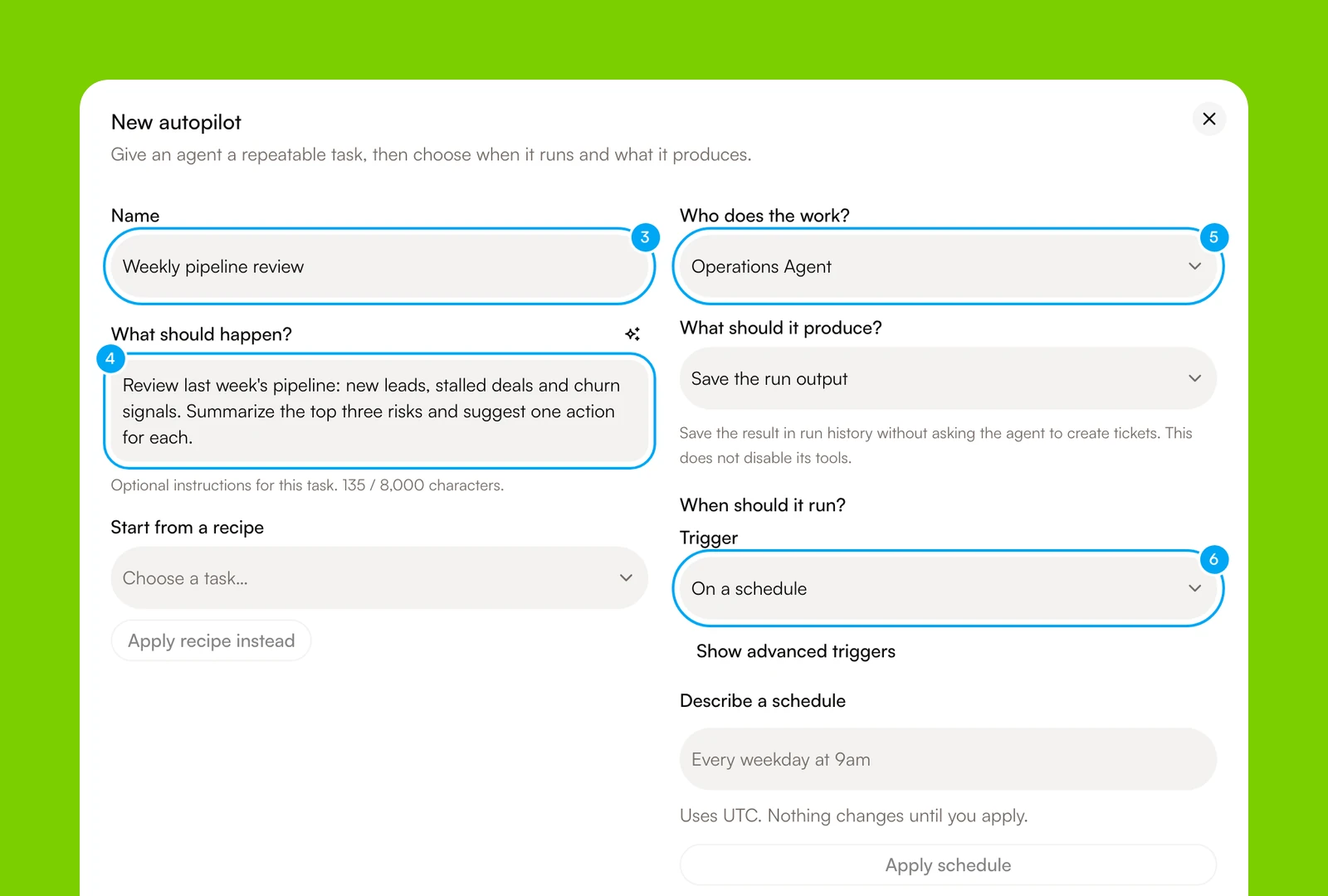
Say you run a small design studio, and the Friday recap eats half a morning. In AI Agent you can hand it to an Autopilot, which gives one agent a written task, a trigger, and an output. Here's the setup.
- In Workflows, click New, then Autopilot.
- Name it. In What should happen?, write the task: which sources to read, what the one-page result looks like, and when the agent must stop and ask you.
- In Who does the work?, choose an agent. In What should it produce?, choose Save the run output, or Create tickets if you want follow-ups to land on the Board.
- In Trigger, choose On a schedule and set the day and time.
A new Autopilot starts paused, and Run now works while it is paused. Click Run now, then open the run under Recent runs to read the result. If the result is wrong, click Edit, fix the instructions, and publish the draft before the next scheduled run. If the agent proposes an action on a connected app, such as an email, it waits as a card for you to approve or reject, so nothing sends on its own. The Configure an Autopilot guide has every field, and templates give you a starting point. Your plan sets how often a schedule can run, so check the limits in the plans and usage docs.
Customer support: where a chatbot ends and an agent begins
People mix up the words chatbot and agent in support. A script-driven chatbot matches keywords to canned answers. A support agent can read the whole message, pick up from the tone when a customer is upset, and look the customer up in your CRM or help desk so the answer fits their account.
Use the tone signal as a routing rule. Upset customers, refunds, and anything legal go to a person, and the agent handles the rest as a draft. In AI Agent you connect Gmail from the Inbox. When you turn on Auto-draft replies, AI Agent drafts a reply to each matching thread, or only to the ones worth a reply if you choose Draft when relevant. Nothing sends until you review it. You can edit the draft, save your edits, send it, or reject it. Automatic drafting of inbound replies is available on the Start plan and above, and the Gmail docs walk through it. The same approval habit is the core of human-in-the-loop AI agents.
Which automation software fits a small team
No single product is the best business automation software for every startup or small team, so match the tool to the shape of the work. Use a rules-based connector when the trigger and the fields are fixed. Use an AI agent workspace when the input is messy language and the next step depends on context. Plenty of teams run both. For the longer version, read AI agents vs traditional automation tools, the platform roundup, or the head-to-head pages for Zapier and Make.
| Kind of tool | Best for | What you are metered on | Where it falls short |
|---|---|---|---|
| Rules-based connectors such as Zapier and Make | Fixed triggers, known fields, and app-to-app handoffs | Zapier counts a task for each successful action step. Make charges credits for each action a scenario performs | Messy text and documents that need interpretation |
| Self-hostable workflow builders such as n8n | Technical teams that want to run the platform themselves | Hosted plans are priced on monthly workflow executions | Hosting, upgrades, and maintenance fall to your team |
| AI agent workspaces such as AI Agent | Research, reports, inbox triage, and follow-up where context decides the next step | Tool actions drawn from a credit pool. Connections and seats are not metered | Model errors need review, it is vendor-hosted only, and it is a weaker fit for simple fixed rules |
One honest note on fit: if every job you have is a clean trigger-and-fields handoff between two apps, a rules-based connector is simpler to audit than an agent. Start there and add an agent only where messy text enters. AI Agent has plans called Free, Start, Pro, and Max, and Start is $49 while Pro is $149 (see pricing). To compare platforms on more than price, use the buyer checklist in our no-code AI agent platform guide.
Frequently asked questions
How much does AI Agent cost for a small business?
AI Agent's paid plans start at $49 for the Start tier, and Pro is $149. The right tier depends on how many workflows, tools, and approval steps your team needs.
How much effort does it take to set up an AI agent?
A small business can start with a no-code workflow built around a recurring task. The main work is choosing reliable sources, defining approval points, and reviewing the agent's drafts until the process is dependable.
What risks should a small business consider before using an AI agent?
An agent can send an incorrect message, use an incomplete source, or update the wrong record if its access and instructions are too broad. Begin with read-heavy tasks and proposed outputs, then require human approval for messages, financial actions, and changes to customer records.
What happens when an AI agent breaks?
A useful workflow has clear stop rules and a person who reviews exceptions. Check the edits people make, narrow the instructions or tool access, and keep a human in charge of anything involving billing, legal concerns, or customer relationships.
What does an AI agent replace in a small business?
It replaces repeated manual work such as sorting inbound messages, assembling routine reports, and drafting follow-up reminders. It does not replace judgment, relationship management, or approval of actions that could affect money or trust.